| Version 224 (modified by , 15 years ago) ( diff ) |
|---|
IPP to PSPS interface: ippToPsps
ippToPsps is the interface between IPP and PSPS. It creates FITS files generated from a multitude of IPP data-sources then publishes them to a datastore in the form of batches. On the PSPS side, the DXLayer polls the datastore, collects batches when they become available, then converts the contents to csv files before sending them on to SQL Server loader software, which merges them into the relevant PSPS database.
The binary tables in the FITS files generated by ippToPsps match the PSPS database schema perfectly, the consequence being that any alterations to the PSPS database schema will only affect ippToPsps code, and not the DXLayer. A certain amount of data validation is performed by ippToPsps before publication, with more validation occurring at the loading and merge stages on the PSPS side.
Simultaneously to loading data, ippToPsps polls PSPS to inquire after the status of the batches it has loaded. Batches that failed can then be reloaded. The status of every batch is maintained in a MySQL database local to ippToPsps. The various temporary copies of the batches are deleted once the ODM reports that they have been successfully loaded or merged.
Batch types
The outputs of ippToPsps are referred to as 'batches', and are detailed below.
| Batch name | PSPS name | Description | IPP Source |
| Initialization | IN | metadata relating to other batches, eg filter ID, survey ID etc | generated from XML config |
| Detections | P2 | single exposure detections | generated from one smf file per exposure plus associated DVO database
|
| Stack | ST | stack image detections | one FITS file generated per IPP cmf, which contains data for one filter on one skycell
|
| Object | OB | tables detailing all objects | one FITS file generated per DVO cpt/cps pairing |
Architecture and design
Outline
The job of ippToPsps is to take a collection of IPP tables and convert them to tables suitable for ingestion to PSPS. Some mappings between IPP and PSPS are direct (eg IPP exposure ID = PSPS frame ID), while many require a format conversion, or can only be derived from multiple IPP fields; some require mining info from other IPP sources, such as DVO databases or the IPP MySQL database, gpc1.
Languages and tools used
The tools chosen for ippToPsps are those considered to be the most effective to tackle the task at hand. As a result, ippToPsps is not consistant with the rest of the IPP code-base (which is predominately Perl and C), but since its role is essentially outside the IPP, this, to me, is not an issue.
MySQL
Because we are dealing with table data that requires some intensive manipulation, it follows that a relational database be used. Relational databases are highly optimized to provide extremely fast query times, especially when indexing in incorporated. Thus we gain speed over the more obvious route of read-a-table-from-FITS-into-an-array-then-loop-through-each-value etc. We also have to write far fewer lines of code.
An added bonus is that, by using keys that enforce uniqueness in a given column (or columns), we protect ourselves against the risk of duplicates making it into PSPS.
ippToPsps uses two MySQL databases, a scratch database, used to import tables and manipulate then before discarding them, and the ippToPsps database, which keeps track of which batches have been processed, published to PSPS etc.
Jython and STILTS
ippToPsps is written in Jython, this is in part to take full advantage of the STILTS package, which enables fast and efficient processing of astronomical catalog data tables. Since it supports FITS, VOTable, and SQL, it is a perfect fit for this project. It is also software maintained elsewhere, reducing the burden on us.
Jython is simply a Java implementation of Python, a modern, high-level, object-oriented language enabling ippToPsps to be written in minimal lines of code, helping it be both more readable and maintainable.
High-level design
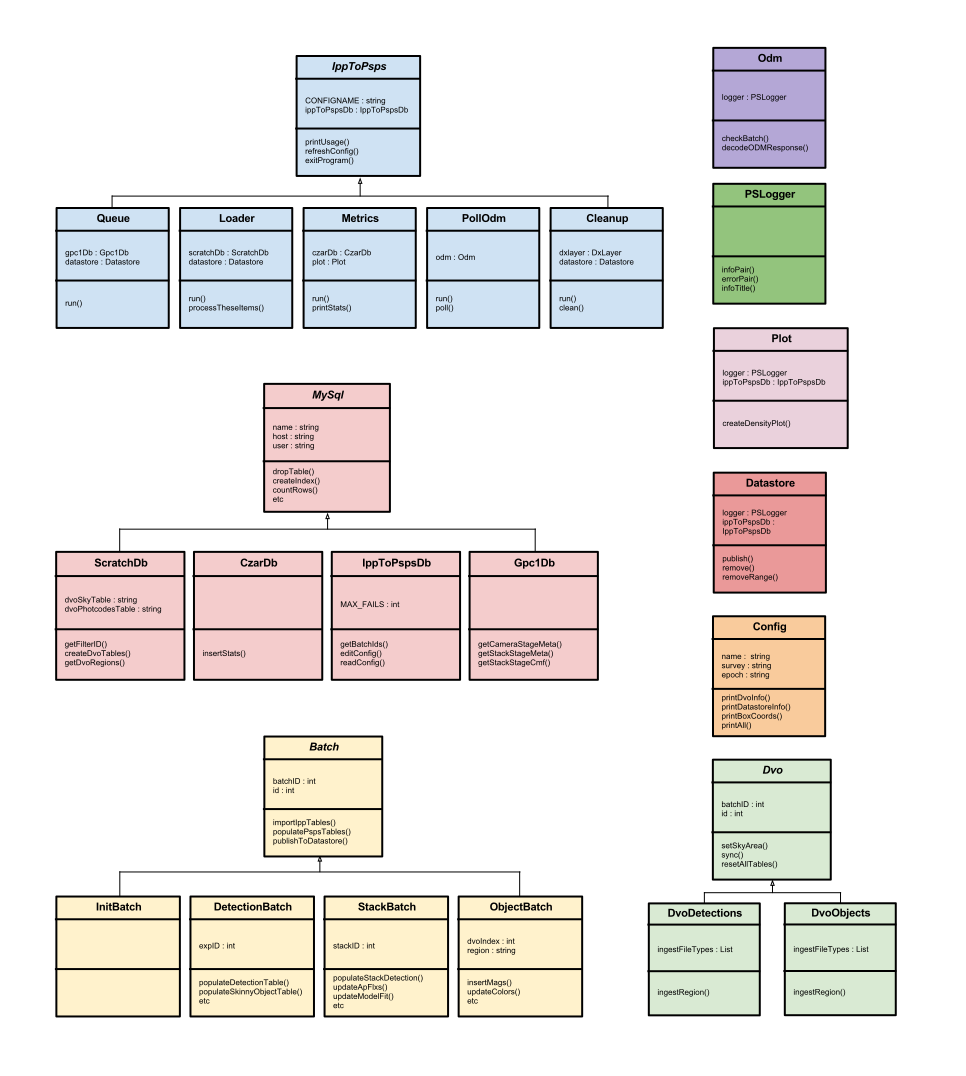
Each batch type produced by ippToPsps (detection, stack, init etc) has its own class, all of which inherit from the Batch base-class, which handles features common to all batches, such as creating and opening output FITS files, connecting to the GPC1 database, connecting with the DVO database etc. This keeps duplicated code at a minimum. The Batch class is an abstract class, i.e. it should not, and cannot, be instantiated.
ippToPsps works like this:
- reads all relevant FITS tables from a given
smforcmfinto temporary tables in a 'scratch' MySQL database - creates empty MySQL tables for PSPS output (also in the 'scratch' database). These tables match the shape of the final PSPS database tables exactly.
- copies all relevant columns from the temporary IPP tables into the PSPS tables, discarding duplicates where necessary
- accesses the DVO database and creates temporary MySQL tables containing all the detections for this
smforcmf - updates the PSPS tables with the IDs from the DVO MySQL tables
- replaces any NULL values with -999, as required by the PSPS loader
- exports the PSPS tables to a FITS file
- publishes FITS file, complete with a batch 'manifest' file, to the datastore
The reading and export of FITS tables is done using STILTS. For import, we can specify which columns we wish to import from the IPP smf and cmf files (we don't need everything).
Configuration
Due to the potential for changes in both input and output for ippToPsps, rather than hard-coding table descriptions, the code is heavily configurable. As such, the tables descriptions are stored as VOTable files (for example), which are a standard of the IVOA. Because VOTables are an XML format, they are both human and machine readable, expandable and self-describing. These VOTables are generated directly from the PSPS schema using a script, so that any changes to the schema can be easily passed-along to ippToPsps.
Another configuration is used to describe a particular 'loading campaign', complete with the names of databases, location of output files, datastore settings etc. This configuration is stored in the ippToPsps database. Details can be found here. All ippToPsps programs require the name of a config at startup as the first argument. Changes to the config can be made at any time, and programs will update accordingly. Most fields are self-explanatory, others that are less obvious will be explained below in the Using the software section.
The ippToPsps database
A full description of the ippToPsps database is detailed here
DVO
ippToPsps needs to access IPP DVO databases in order to attain various IDs that are assigned within DVO. This is done is two different ways, depending on survey.
DVO has an API written in C that can be used to extract detection records for a give 'IMAGEID' found in cmf and smf file headers (see note below regarding IMAGEID confusion). The usual case is that ippToPsps uses this form of DVO access using a small C program called dvograbber, the source for which is in the ippToPsps/src directory.
ippToPsps has a second way of accessing DVO, which is only intended to be used in the special case of surveys (like MD4), or areas of surveys, have very high coverege in a certain area of sky meaning the underlying DVO FITS grow to a very large large size. For such areas, it becomes unfeasible to access DVO via the C api as repeatedly reading FITS files as large as 2GB causes read tiumes of up to hours per frame.
Instead, for these regions, ippToPsps can pre-ingest a region of DVO into a scratch MySQL database.
It can take a long time to convert a relatively small DVO database to MySQL, however, querying the MySQL database is hugely faster than accessing DVO directly, especially for regions of sky with a high density of detections such as the medium deep fields. (This was seen when loading MD4 prior to the Boston meeting in May 2011. DVO access per exposure was 40 minutes, whereas, once imported to MySQL, query time was roughly 30 seconds.)
Image ID confusion
We access DVO via a combination of 'source ID' and 'image ID'. Both numbers come from the smf file. However, IMAGEID in the smf does not correspond to IMAGE_ID in DVO, instead, it maps to EXTERN_ID in the Images.dat file at the top-level of a given DVO database. The IMAGE_ID column of the same table maps instead to IMAGE_ID in the various 'cpm' (measurements) files contained within the subdirectories of the same DVO database.
ippToPsps programs
ippToPsps consists of numerous programs that work together to queue, process and monitor data as it passes from the IPP to PSPS. All programs can be run like this:
cd trunk/ippToPsps/jython
./run.sh prog.py someConfigName
The ./run.sh prefix above is necessary to invoke the correct Java virtual machine, while including the relevant jar files in the CLASSPATH (all included in the trunk/ippToPsps/Jars subdir). Programs that require any extra arguments will prompt the user.
All ippToPsps programs register with the ippToPsps database upon start-up, adding a row in the clients table. While running, all programs routinely check the ippToPsps database to check for changes in the config, or to see if they should be paused or stopped.
All programs catch Ctrl-C for clean exiting, and all programs write a log to stdout as well as to file, the location of which is set in the settings file
console.py- a GUI for high-level management of loadingqueue.py- for queueing up data to process for a given configloader.py- to actually process and load the queued data in the form of batchespollodm.py- to poll the PSPS ODM to gather information about the process of each batchcleanup.py- to cleanup batches from the datastore, DXLayer and local disk based on batch status acquired bypollodm.pymetrics.py- for monitoring processing. Vital statistics are stored in the czartool databaseplotter.py- for generating density plots of pending data for a given configsetupScratchDb.py- for setting up a scratch database
More detail about each program follows.
queue.py
Before any loader.py clients can do anything, you must queue something up. To do this run:
./run.sh queue.py someConfig
Data to be processed is divided up in a grid on the sky, using the RA/Dec and box-size settings in the config. The plotter.py program can generate a density plot of data still to be processed through ippToPsps, an example of which is shown below.

The master list of items to be processed comes from the gpc1 addRun table, which lists all items currently merged into the DVO database we are using. From this list, queue.py subtracts items that have already been successfully loaded to the datastore already, as well as items that have routinely failed to process, and queues up the remainder.
Each config requires an entry in the epoch column. An epoch in the context of ippToPsps is the date that we count as the beginning. If we loaded IPP data to PSPS once and only once, this would not be necessary: we would queue up all available exposures and stacks and simply load them. However, the early stages of the project have required multiple re-loads of data while the IPP perfects the science, necessitating that the same exposures and stacks are loaded more than once. Because queue.py queues available items by taking into account those that have already been published to PSPS, we have to give it an epoch date from which to accurately determine those exposure that have been loaded or not. Generally speaking, the epoch is reset every time we delete the main PSPS database.
loader.py
loader.py is the program that actually processes and publishes data to PSPS. You can run one or more instances of loader.py as the code has been designed so taht they will run concurrently without causing any problems. Note, however, that clients on machines where the DVO database is not on a local disk will run more slowly due to the increased burden of accessing DVO over the network. Also, loader.py will only run on a host with a scratch database setup. Instructions for this are [here].
loader.py programs actually process the data and upload it to the datastore for PSPS. They look to the queue tables in the ippToPsps database for a list of items to process. They first attempt to secure a a 'stripe' of RA (from the stripe table) that is not being processed by any other loader.py clients. If all available stripes have already been reserved, then it chooses the stripe with the largest number of pending items.
With a stripe chosen, loader.py gathers a list of box_ids (each stripe is sub-divided into boxes). It works its way through each box, processing all pending items.
Because it is possible, and usual, to run multiple versions of loader.py (in order to speed up loading time), the method to begin processing a new batch is part of a critical section. This simply means that the 'batch' table in the ippToPsps database is locked by a client looking for a new item to process, then released afterwards, ensuring that two separate loader.py instances do not attempt to process the same item.
pollodm.py
pollodm.py's job is to poll the PSPS ODM webservice to establish the status of each batch as it passes through the PSPS system. Gathering this information allows cleanup.py to know when it can delete existing copies of batches.
cleanup.py
cleanup.py monitors the status of each batch for a given config and deletes the three existing copies at the appropriate time.
./run.sh cleanup.py someConfigName
The deletion policy is as follows.
When loading, three copies of the data exist: the original files on disk, the batches on the datastore and a third copy on the PSPS loading machine. The deletion policy at present is:
- when a batch has been loaded to the ODM and has a status of 'merge worthy' or 'failed', then the copy on the datastore and the DXLayer's copy can be removed
- when a batch has been successfully merged into the PSPS database, then final copy on local disk may be deleted
The logic for this is that errors may occur during the merge phase and it is useful to have local copies of offending batches for debugging purposes. This standard behavior can be changed by setting the appropriate values in the deletion section of the config.
Purging TODO
metrics.py
metrics.py is a program that collects useful statistics for a particular config and reports then to the screen, while also inserting data into the czartool database. The ippMonitor czartool page for ippToPsps displays much of this information, complete with time series plots showing the progress of processing.
metrics.py takes a second argument which is a time (in hours). If this is provided the program will sleep then run again after that time.
An example output from metrics.py is shown below.
./run.sh metrics.py someConfig
And will produce a response similar to this:
                ippToPsps loading summary

Time now                                2011-09-29 11:54:33
Loading epoch                           2011-08-16
DVO label                               LAP.ThreePi.20110809

+----+------------------+---------------+-------------------+------------------+----------------+
|Type| batches per hour | last 24 hours | per day this week | total detections | last published |
+----+------------------+---------------+-------------------+------------------+----------------+
| P2 |              0.0 |           283 |             329.4 |       1855730051 |  4.6 hours ago |
| ST |              0.0 |         12936 |            4539.0 |        185807608 |  3.7 hours ago |
+----+------------------+---------------+-------------------+------------------+----------------+

+----+-------+-------------------+-------------------+-------------------+-------------------+-------------------+-------------------+-------------------+-------------------+
|Type|  DVO  |          processed|loaded_to_datastore|      loaded_to_ODM|       merge_worthy|             merged|  deleted_datastore|    deleted_dxlayer|      deleted_local|
|    |       | Pend  Succ  Fail  | Pend  Succ  Fail  | Pend  Succ  Fail  | Pend  Succ  Fail  | Pend  Succ  Fail  | Pend  Succ  Fail  | Pend  Succ  Fail  | Pend  Succ  Fail  |
+----+-------+-------------------+-------------------+-------------------+-------------------+-------------------+-------------------+-------------------+-------------------+
| P2 |  8140 |       8101    39  |    2  8099        | 2041  6049     9  |       6049        |  313  5736        |       5736        | 5736              |                   |
| ST | 32309 |      31684   625  |    5 31679        |24617  7062        |       7062        | 7062              |                   |                   |                   |
+----+-------+-------------------+-------------------+-------------------+-------------------+-------------------+-------------------+-------------------+-------------------+
plotter.py
setupScratchDb.py
This program simply sets up a scratch database ready for processing. Details of it's use can be found here.
Setting up a loading machine
Each instance of loader.py uses a 'scratch' MySQL database on localhost while processing. So, to do any loading, a local MySQL server should be up-and-running with a database created as the ipp user for use by ippToPsps. The default name for this is ipptopsps_scratch.
Because ippToPsps uses this local database as a scratch database, there are large number of inserts and deletions, meaning large log files. For this reason, it is important to configure MySQL to store its data on a local partition, and not /var as is the default. For example, on ipp005:
/var/lib/mysql
was moved to:
/export/ipp005.0/mysql
In addition, it is prudent to decrease the default MySQL log-retention period from 90 days to 1 day. This is done is in
/etc/mysql/my.cnf
on the line
expire_logs_days = 90
You will need (if it is not done already) to create an ipp user. Connect to the local MySQL server as root then to the following.
GRANT ALL PRIVILEGES ON *.* TO 'ipp'@'localhost' IDENTIFIED BY 'ipp' WITH GRANT OPTION;
Now disconnect then reconnect as ipp and create the scratch database.
CREATE DATABASE ipptopsps_scratch;
Finally, you need to setup the scratch database with the initialization tables and stored procedures necessary for processing. To do this, use the setupScratchDb.py program, like this:
./run.sh setupScratchDb.py someConfig nameOfScratchDb
The choice of config here is not important, so use any.
At the time of writing, scratch databases are set up on the following IPP hosts:
ipp005
ipp006
ipp007
ipp033
ipp034
ipp045
ipp005 and ipp045 in fact have three scratch databases each, so three clients can potentially be run on these machines. This is particularly useful on ipp005 as this is where the DVO databases are currently stored, so clients running on the same machine have a much higher throughput. (ipp045 used to host a backup 3pi DVO database.)
Creating and publishing an 'IN' batch
The same program is used to create IN batches, but requires one extra argument, like this:
./run.sh loader.py someConfig init
This will produce an IN batch, publish it, then stop (the IN-batch MySQL tables will also be updateded in the local scratch database).
Test mode
One field in the config, under the options section, is testMode. This is a boolean, i.e. can be either 1 or 0. When switched on, each batch type will be run in it's own test mode. For detections, this means:
- it will only process the first exposure that is queued
- it will only process OTA 33 from this exposure
- it will ignore certain missing values, which would otherwise fail the batch
Known issues
Some programs, specifically pollOdm.py and cleanup.py, suffer from a know Jython bug where open files are not close properly, causing a crash with this error:
Links
Recovery system design
Some notes prepared for the PSPS operational readiness review can be found here.
Datastore test area for PSPS on Maui
Datastore test area for PSPS at JHU
Datastore test area for PSPS at JHU
Datastore test area for PSPS at JHU
Attachments (2)
- new3pi_P2_2012_0308_135938.png (5.4 KB ) - added by 15 years ago.
- ipptopspsclassdiagram.svg (791.2 KB ) - added by 15 years ago.
Download all attachments as: .zip