| Version 290 (modified by , 15 years ago) ( diff ) |
|---|
IPP to PSPS interface: ippToPsps
ippToPsps is the interface between IPP and PSPS. It creates FITS files generated from a multitude of IPP data-sources then publishes them to a datastore in the form of batches. On the PSPS side, the DXLayer polls the datastore, collects batches when they become available, then converts the contents to csv files before sending them on to MSSQL Server loader software, which merges them into the relevant PSPS database.
The binary tables in the FITS files generated by ippToPsps match the PSPS database schema perfectly, the consequence being that any alterations to the PSPS database schema will only affect ippToPsps code, and not the DXLayer. A certain amount of data validation is performed by ippToPsps before publication, with more validation occurring at the loading and merge stages on the PSPS side.
Simultaneously to loading data, ippToPsps polls PSPS to inquire after the status of the batches it has loaded. Batches that failed can then be reloaded. The status of every batch is maintained in a MySQL database local to ippToPsps. The various temporary copies of the batches are deleted once the ODM reports that they have been successfully loaded or merged.
Batch types
The outputs of ippToPsps are referred to as 'batches', and are detailed below.
| Batch name | PSPS name | Description | IPP Source |
| Initialization | IN | metadata relating to other batches, eg filter ID, survey ID etc | generated from XML config |
| Detections | P2 | single exposure detections | generated from one smf file per exposure plus associated DVO database
|
| Stack | ST | stack image detections | one FITS file generated per IPP cmf, which contains data for one filter on one skycell
|
| Object | OB | tables detailing all objects | one FITS file generated per DVO cpt/cps pairing |
Quick user guide
It is hoped that these pages contain all necessary documentation for running and maintaining ippToPsps, but this sections aims to provide a high-level user-guide.
In order to load data from IPP to PSPS, do the following:
- set up a config (see here for more details)
- run the
queue.pyprogram - if a new PSPS survey, run
loader.pyto create an init 'IN' batch - run one or more
loader.pyprograms to process and publish items that have been queued - run
pollOdm.pyin order to collect data about the progress of loading through PSPS - run
metrics.pyin order to monitor loading (also viewable via the Czartool page) - run
cleanup.pyto clean up data
Architecture and design
Outline
The job of ippToPsps is to take a collection of IPP tables and convert them to tables suitable for ingestion to PSPS. Some mappings between IPP and PSPS are direct (eg IPP exposure ID = PSPS frame ID), while many require a format conversion, or can only be derived from multiple IPP fields; some require mining info from other IPP sources, such as DVO databases or the IPP MySQL database, gpc1.
Languages and tools used
The tools chosen for ippToPsps are those considered to be the most effective to tackle the task at hand. As a result, ippToPsps is not consistant with the rest of the IPP code-base (which is predominately Perl and C), but since its role is essentially outside the IPP, this, to me, is not an issue.
MySQL
Because we are dealing with table data that requires some intensive manipulation, it follows that a relational database be used. Relational databases are highly optimized to provide extremely fast query times, especially when indexing in incorporated. Thus we gain speed over the more obvious route of read-a-table-from-FITS-into-an-array-then-loop-through-each-value etc. We also have to write far fewer lines of code.
An added bonus is that, by using keys that enforce uniqueness in a given column (or columns), we protect ourselves against the risk of duplicates making it into PSPS.
ippToPsps uses two MySQL databases, a scratch database, used to import tables and manipulate then before discarding them, and the ippToPsps database, which keeps track of which batches have been processed, published to PSPS etc.
Jython and STILTS
ippToPsps is written in Jython, this is in part to take full advantage of the STILTS package, which enables fast and efficient processing of astronomical catalog data tables. Since it supports FITS, VOTable, and SQL, it is a perfect fit for this project. It is also software maintained elsewhere, reducing the burden on us.
Jython is simply a Java implementation of Python, a modern, high-level, object-oriented language enabling ippToPsps to be written in minimal lines of code, helping it be both more readable and maintainable.
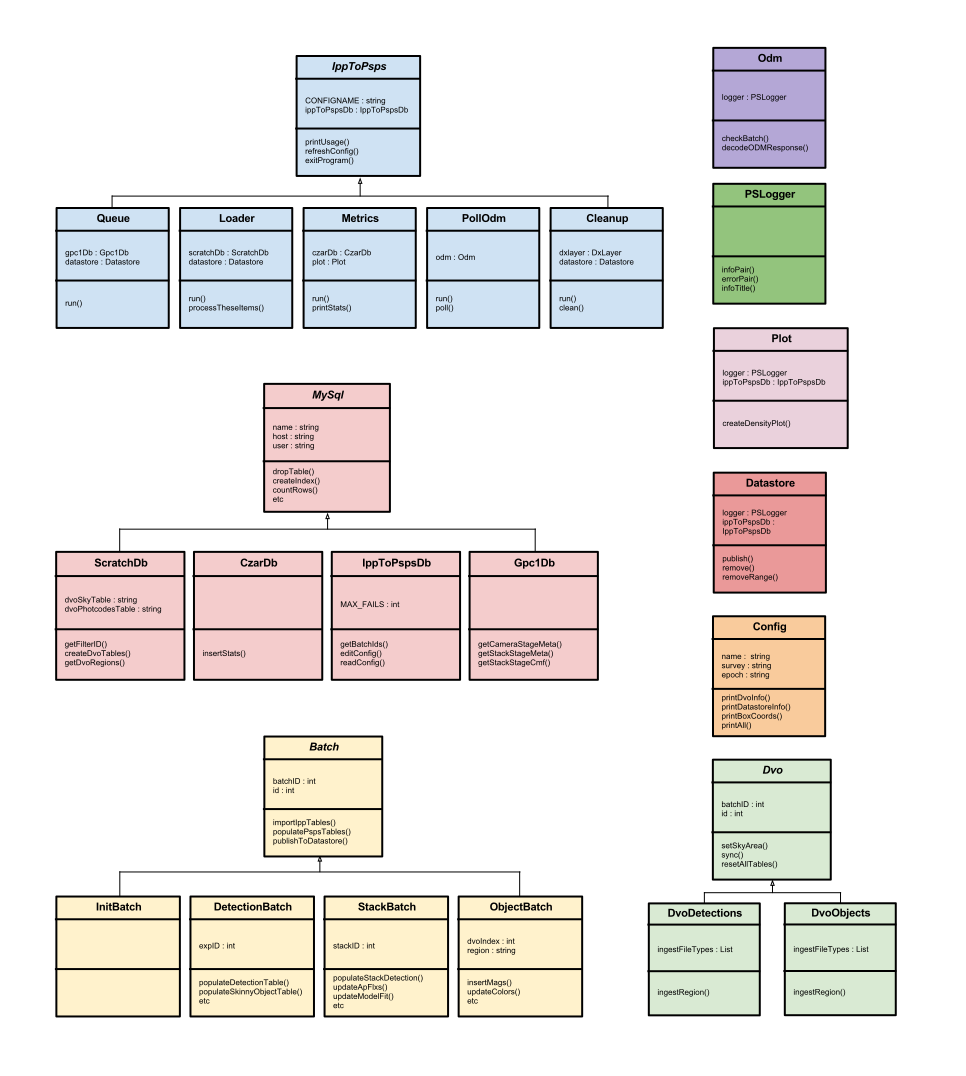
Class hierarchy
Programs
There are currently eight program classes:
- Console
- Queue
- Loader
- PollOdm
- Cleanup
- Metrics
- Plotter
- SetupScratchDb
All of which extend the base-class, IppToPsps , which handles generic functionality for all programs such as setting up logging, reading the configuration data, handling signals etc.
Batches
There are currently four batch classes:
- DetectionBatch
- StackBatch
- InitBatch
- ObjectBatch
All of the above inherit from the Batch base-class, which handles functionality common to all batches, such as creating and opening output FITS files, connecting to the GPC1 database, connecting with the DVO database etc. This keeps duplicated code at a minimum. The Batch class is an abstract class, i.e. it should not, and cannot, be instantiated.
Databases
There are four database classes:
- CzarDb
- Gpc1Db
- IppToPspsDb
- ScratchDb
All of which inherit from base-class MySql, which provides all generic MySQL functionality (creating tables, dropping tables, adding indexes, making row counts etc).
Dvo
Two Dvo classes are used for the ingestion of data into MySQL from a DVO database:
- DvoDetections
- DvoObjects
Both classes inherit from the Dvo base class that handles most of the work. The subclasses implement which DVO files to ingest, and how.
Configuration
Three types of configuration exist for ippToPsps, but only loading configs will be of much interest to the user.
PSPS table descriptions
Due to the potential for changes in both input and output for ippToPsps, rather than hard-coding table descriptions, the code is heavily configurable. As such, the tables descriptions are stored as VOTable files (for example), which are a standard of the IVOA. Because VOTables are an XML format, they are both human and machine readable, expandable and self-describing. These VOTables are generated directly from the PSPS schema using a script, so that any changes to the schema can be easily passed-along to ippToPsps.
Settings file
This XML file contains configuration information that does not need to change per loading campaign, eg things like database locations and where to store logs. It can be found under svn settings here.
Loading configs
Loading configs are the where the user actually defines what ippToPsps should do for a particular 'loading campaign'. This configuration data is stored in the ippToPsps database, details of which can be found here. All ippToPsps programs require a config argument at start-up. This can be one of three things:
- the name of a particular config currently in the config table of the database, meaning that program will run using only that config
- all meaning that program will cycle through all 'active' configs
- edit allows the user to edit, or create, a config then the program proceeds to use that config
The 'all' option is handy for programs like metrics.py or cleanup.py; instead of having an intance of these programs per config, one instance can cycle through them all. The edit option can be used when creating a config for the first time, or to edit an existing one. As an example:
./run.sh queue.py edit
 * Name for new config, or existing config to edit? testconfig
 * datastore_product (varchar(30))? PSPS_test
 * datastore_type (varchar(30)) hit return to accept default of: 'IPP_PSPS'?
 * datastore_publish (tinyint(1)) hit return to accept default of: '0'? 1
 * dvo_label (varchar(100))? MD04.20120307
 * dvo_location (varchar(1000))? /data/ipp005.0/gpc1/catdirs/LAP.ThreePi.20110809
 * min_ra (double) hit return to accept default of: '0'?
In addition, changes to configs can be made at any time and programs will update accordingly.
Databases
ippToPsps programs use up to four databases. All access the ippToPsps database, which tracks all processing of batches through ippToPsps. A full description of the ippToPsps database is detailed here. loader.py and queue.py both also make use of a 'scratch' database, a database on the local machine used during processing with data discarded upon completion. Details of the scratch database can be found here.
In addition, certain ippToPsps programs also access the IPP gpc1 database and metrics.py accesses the IPP czartool database, in order to update it with the current state of ippToPsps processing.
Accessing DVO
ippToPsps needs to access IPP DVO databases in order to attain various IDs that are assigned within DVO. This is done in two different ways, depending on survey.
DVO has an API written in C that can be used to extract detection records for a give 'IMAGEID' found in cmf and smf file headers (see note below regarding IMAGEID confusion). The usual case is that ippToPsps uses this form of DVO access using a small C program called dvograbber, the source for which is in the ippToPsps/src directory, here.
ippToPsps has a second way of accessing DVO, which is only enabled when parts of the sky are encountered where there is especially large coverage, eg a medium deep field. In such regions, the underlying DVO FITS grow to a very large size and it becomes unfeasible to access DVO via the C api as repeatedly reading FITS files as large as 2GB causes read times of up to hours per frame.
So, for these regions, ippToPsps can pre-ingest a region of DVO into a scratch MySQL database.
It can take a long time to convert a relatively small DVO database to MySQL, however, querying the MySQL database is hugely faster than accessing DVO directly, especially for regions of sky with a high density of detections such as the medium deep fields. (This was seen when loading MD4 prior to the Boston meeting in May 2011. DVO access per exposure was 40 minutes, whereas, once imported to MySQL, query time was roughly 30 seconds.)
The decision of when to pre-ingest DVO into MySQL is made in the loader.py. The queue.py program has already queued up smfs to load by box on the sky. loader.py uses the ratio of smfs files to size of DVO files on disk to determine if it is worthwhile pre-ingesting, or else importing DVO data the usual (C-interface) way. When the loader progresses to the next, neighboring box, the same ratio is calculated. If the decision is made again to pre-ingest from DVO, then any DVO regions overlapping both boxes are retained, while the remainder are purged before importing the new ones. Most of this functionality is handles in the various dvo classes. The Dvo base class can be found here.
DVO ingestion by the Dvo classes works a little like rsync in that file modified dates are maintained in the scratch database and if an out-of-date file is encountered it is re-ingested. This is particularly important for the high level DVO tables like Photcodes. SkyTable and Images.
Image ID confusion
We access DVO via a combination of 'source ID' and 'image ID'. Both numbers come from the smf file. However, IMAGEID in the smf does not correspond to IMAGE_ID in DVO, instead, it maps to EXTERN_ID in the Images.dat file at the top-level of a given DVO database. The IMAGE_ID column of the same table maps instead to IMAGE_ID in the various 'cpm' (measurements) files contained within the subdirectories of the same DVO database.
ippToPsps programs
ippToPsps consists of numerous programs that work together to queue, process and monitor data as it passes from the IPP to PSPS. All programs can be run like this:
cd trunk/ippToPsps/jython
./run.sh prog.py someConfig
The ./run.sh prefix above is necessary to invoke the correct Java virtual machine, while including the relevant jar files in the CLASSPATH (all included in the trunk/ippToPsps/Jars subdir). Programs that require any extra arguments will prompt the user.
For details about the config argument, see the configuration section here.
All ippToPsps programs register with the ippToPsps database upon start-up, adding a row in the clients table. While running, all programs routinely check the ippToPsps database to check for changes in the config, or to see if they should be paused or stopped.
All programs catch Ctrl-C for clean exiting, and all programs write a log to stdout and some to file, the location of which is set in the settings file. Extra information about logging can be found here.
console.py- a GUI for high-level management of loadingqueue.py- for queueing up data to process for a given configloader.py- to actually process and load the queued data in the form of batchespollodm.py- to poll the PSPS ODM to gather information about the process of each batchcleanup.py- to cleanup batches from the datastore, DXLayer and local disk based on batch status acquired bypollodm.pymetrics.py- for monitoring processing. Vital statistics are stored in the czartool databaseplotter.py- for generating density plots of pending data for a given configsetupScratchDb.py- for setting up a scratch database
More detail about each program below.
queue.py
Before any loader.py clients can do anything, you must queue something up. To do this run:
./run.sh queue.py someConfig
Data to be processed is divided up in a grid on the sky, using the RA/Dec and box-size settings in the config. The plotter.py program can generate a density plot of data still to be processed through ippToPsps, an example of which is shown below.

For stacks and single-frame detections, the master list of items to be processed comes from the gpc1 addRun table, which lists all items currently merged into the DVO database we are using. From this list, queue.py subtracts items that have already been successfully loaded to the datastore already, as well as items that have routinely failed to process, and queues up the remainder. For object batches, the DVO database is queries for individual regions that fall within the box. So:
| Batch type | unique identifier |
| P2 | cam_id from gpc1 database |
| ST | stack_id from gpc1 database |
| OB | INDEX from SkyTable.DAT file in DVO database |
Each config requires an entry in the epoch column. An epoch in the context of ippToPsps is the date that we count as the beginning. If we loaded IPP data to PSPS once and only once, this would not be necessary: we would queue up all available exposures and stacks and simply load them. However, the early stages of the project have required multiple re-loads of data while the IPP perfects the science, necessitating that the same exposures and stacks are loaded more than once. Because queue.py queues available items by taking into account those that have already been published to PSPS, we have to give it an epoch date from which to accurately determine those exposure that have been loaded or not. Generally speaking, the epoch is reset every time we delete the main PSPS database.
loader.py
loader.py is the program that actually processes and publishes data to PSPS. You can run one or more instances of loader.py as the code has been designed so taht they will run concurrently without causing any problems. Note, however, that clients on machines where the DVO database is not on a local disk will run more slowly due to the increased burden of accessing DVO over the network. Also, loader.py will only run on a host with a scratch database setup. Instructions for this are here. Note that loader.py will look for an available scratch database that is not in use by anyone else, if none are found then it will quit.
The first thing a loader.py instance does is look to the queue tables in the ippToPsps database for a list of items to process. It first attempt to secure a 'stripe' of RA (from the stripe table) that is not being processed by any other loader.py clients. If all available stripes have already been reserved, then it chooses the stripe with the largest number of pending items.
With a stripe chosen, loader.py gathers a list of box_ids (each stripe is sub-divided into boxes). It works its way through each box, processing all pending items. Batches are processed like this:
- all relevant FITS tables from a given
smforcmfor DVO database are read into temporary tables in the scratch MySQL database - empty MySQL tables for PSPS output are created, also in the 'scratch' database. These tables match the shape of the final PSPS database tables exactly.
- all relevant columns from the temporary IPP tables are copied into the PSPS tables, discarding duplicates where necessary
- for P2 and ST batches, the DVO database is accessed and all IDs are read for the detections we are interested in
- any remaining NULL values are replaced with -999, as required by the PSPS loader
- PSPS tables are exported to a FITS file
- FITS file is published, complete with a batch 'manifest' file, to the datastore
The reading and export of FITS tables is done using STILTS. For import, we can specify which columns we wish to import from the IPP smf and cmf files (we don't need everything).
Because it is possible, and usual, to run multiple versions of loader.py (in order to speed up loading time), the method to begin processing a new batch is part of a critical section. This simply means that the 'batch' table in the ippToPsps database is locked by a client looking for a new item to process, then released afterwards, ensuring that two separate loader.py instances do not attempt to process the same item.
Test mode
When run in 'test' mode, loader.py will do the following in the case of P2 batches:
- it will only process the first exposure that is queued
- it will only process OTA 33 from this exposure
- it will ignore certain missing values, which would otherwise fail the batch
Creating and publishing an 'IN' batch
Once special use of loader.py is when it is necessary to create an initialization batch, used when created a new PSPS survey. loader.py is run the usual way, but with one extra argument, like this:
./run.sh loader.py someConfig init
This will produce an IN batch, publish it, then stop (the IN-batch MySQL tables will also be updated in the local scratch database).
pollOdm.py
pollOdm.py's job is to poll the PSPS ODM webservice to establish the status of each batch as it passes through the PSPS system. Gathering this information allows cleanup.py to know when it can delete existing copies of batches.
pollOdm.py takes a few extra args, as shown here:
Usage: pollOdm.py <configPath> <P2|ST|OB|all> <unloaded|unmergeworthy|unmerged|all> [hours]
Where the first argument sets batch type and the second which PSPS stage to check. So, example usage might be:
./run.sh pollOdm.py someConfig all all 1
cleanup.py
cleanup.py monitors the status of each batch for a given config and deletes the three existing copies at the appropriate time.
./run.sh cleanup.py someConfig
The deletion policy is as follows.
When loading, three copies of the data exist: the original files on disk, the batches on the datastore and a third copy on the PSPS loading machine. The deletion policy at present is:
- when a batch has been loaded to the ODM and has a status of 'merge worthy' or 'failed', then the copy on the datastore and the DXLayer's copy can be removed
- when a batch has been successfully merged into the PSPS database, then final copy on local disk may be deleted
The logic for this is that errors may occur during the merge phase and it is useful to have local copies of offending batches for debugging purposes. This standard behavior can be changed by setting the appropriate values in the deletion section of the config.
Purging
There may be occasions when you which to simply purge the system of a range of batches. Simply set the 'purged' column to '1' in the batch table for any batches you want removed, and cleanup.py will get rid of them.
metrics.py
metrics.py is a program that collects useful statistics for a particular config and reports then to the screen, while also inserting data into the czartool database. The ippMonitor czartool page for ippToPsps displays much of this information, complete with time series plots showing the progress of processing.
Note: Because metrics.py invokes gnuplot, it needs to run on one of the (few) IPP machines that have the correct version of gnuplot installed, currently ipp009 and ipp004.
metrics.py takes a second argument which is a time (in hours). If this is provided the program will sleep then run again after that time.
An example output from metrics.py is shown below.
./run.sh metrics.py someConfig
And will produce a response similar to this:
                ippToPsps loading summary

Time now                                2011-09-29 11:54:33
Loading epoch                           2011-08-16
DVO label                               LAP.ThreePi.20110809

+----+------------------+---------------+-------------------+------------------+----------------+
|Type| batches per hour | last 24 hours | per day this week | total detections | last published |
+----+------------------+---------------+-------------------+------------------+----------------+
| P2 |              0.0 |           283 |             329.4 |       1855730051 |  4.6 hours ago |
| ST |              0.0 |         12936 |            4539.0 |        185807608 |  3.7 hours ago |
+----+------------------+---------------+-------------------+------------------+----------------+

+----+-------+-------------------+-------------------+-------------------+-------------------+-------------------+-------------------+-------------------+-------------------+
|Type|  DVO  |          processed|loaded_to_datastore|      loaded_to_ODM|       merge_worthy|             merged|  deleted_datastore|    deleted_dxlayer|      deleted_local|
|    |       | Pend  Succ  Fail  | Pend  Succ  Fail  | Pend  Succ  Fail  | Pend  Succ  Fail  | Pend  Succ  Fail  | Pend  Succ  Fail  | Pend  Succ  Fail  | Pend  Succ  Fail  |
+----+-------+-------------------+-------------------+-------------------+-------------------+-------------------+-------------------+-------------------+-------------------+
| P2 |  8140 |       8101    39  |    2  8099        | 2041  6049     9  |       6049        |  313  5736        |       5736        | 5736              |                   |
| ST | 32309 |      31684   625  |    5 31679        |24617  7062        |       7062        | 7062              |                   |                   |                   |
+----+-------+-------------------+-------------------+-------------------+-------------------+-------------------+-------------------+-------------------+-------------------+
plotter.py
setupScratchDb.py
This program simply sets up a scratch database ready for processing. Details of its use can be found here.
Logging
All ippToPsps programs log to either stdout, or file or both. This can be changed by altering the arguments to the IppToPsps class constructor. By default, only the loader.py logs to file, while also logging to stdout. All other programs only log to stdout. The location for log files, which include program name, config, host and PID in the name, is set in the setting files, here.
Known issues
Some programs, specifically pollOdm.py and cleanup.py, suffer from a know Jython bug where open files are not close properly, causing a crash with this error:
java.io.IOException: error=24, Too many open files
In absence of a fix in a new version of Jython, there is no easy workaround other than simply restarting the program.
Links
Recovery system design
Some notes prepared for the PSPS operational readiness review can be found here
Datastore test area for PSPS on Maui
Datastore test area for PSPS at JHU
Datastore test area for PSPS at JHU
Attachments (2)
- new3pi_P2_2012_0308_135938.png (5.4 KB ) - added by 15 years ago.
- ipptopspsclassdiagram.svg (791.2 KB ) - added by 15 years ago.
Download all attachments as: .zip